Inge and Dimag
With Inge it is possible to integrate DIMAG as a repository for the primary data. The original files are then stored not in Anton's local file system but in DIMAG. Only the files optimised for the internet remain in Anton. Where necessary, internal users can download the original files. From the users' perspective there is therefore no difference.
Requirements
- Setting
fulltext-from-webpdf: true - Setting
cloud: "inge" - .env INGE_API_TOKEN
- User "Inge" with an email address and
api_tokenfor Inge, holding at least the role editor
Inge needs the editor role
Confirming the ingest and restoring the state before it
(/api/sips/{id}/confirm and /revert) are reserved for editors — a
token alone is not enough. If the service user "Inge" does not hold the
role, Anton answers the closing step of the cycle with a 403 and the
ingest stays unconfirmed.
Course of the SIP ingest
Anton
- User: SIP upload (zip) (
/sip/uploadsip) - User: SIP validation (
/sip/validation)- Anton can unpack the SIP (unzip) and the metadata file is readable.
- The files from the SIP are present and the checksums are correct.
- Anton can find a parent in Anton for every dossier in the SIP.
- User: Anton ingest (
/sip/ingest)- Backup of the database
- Import SIP (
<dossier>and<dokument>/<datei>)- Entry in the import log, signature
IMPORT-{yyyy}-{NNN} - Import dossiers and documents/files
- Anton creates web versions and thumbnails
- if the SIP ingest takes place with Inge and DIMAG, Anton deletes the master files
- Reference codes and file names are initially based on UUIDs
- Entry in the import log, signature
- Post import (listener
ImportFinished)- Update of the archive hierarchy (
path) - Update of the datings and the full-text index
- Update of the archive hierarchy (
The event MediumAdded triggers the import of the individual media, which is handled asynchronously in each case.
Ingest with Inge into DIMAG
The event MediumAdded is triggered with a delay, that is, after the import has been completed and the reference codes have already been corrected. This event triggers the conversion of the media (listener MediumCreateWebVersion). When Inge is used, the original file is copied into the sips path, which Inge can also access. The import into Inge then takes place (Anton\Helpers\Inge::class, import). When Inge reports success, the conversions are carried out and the master medium is deleted.
Inge: - Anton sends one request per file to Inge with the SIP and a list of the Anton media IDs - Inge: ingest of the files into DIMAG - Inge creates a loadXML file - Inge creates an ingest package and stores it on DIMAG's SFTP storage - Inge sends a request to DIMAG: ingest of the SIP - DIMAG: imports the package and sends the result to Inge - Inge: sends the result to Anton - Anton: finalises the SIP ingest - Confirms the ingest (DIMAG report on the run) or restores the state before the ingest from the backup - Sends an email to the user Inge with the result
Retrieving a master file
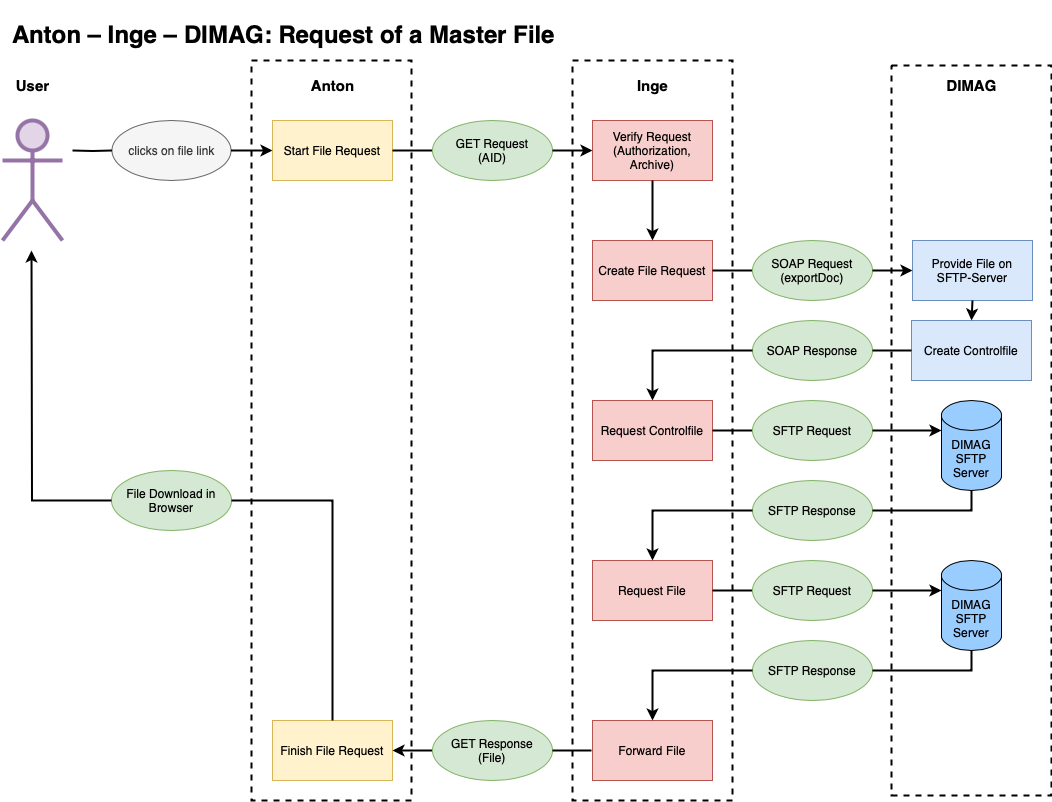
CLI
php artisan anton:import --env {slug} --from-sip --no-validation
--create-actors -vv {path/to/sip} --import
Reverting a SIP import or confirming an import with Inge
Before a SIP import, Anton backs up the database, so that if anything goes wrong the state before the import can be restored.
The backup name is recorded on the run, in the import log under Admin → Data import → Imports.
The following restores the database from the last/current backup and synchronises the media with the database (namely deletes media that are not registered in the database):
php artisan sip:check-import --env {slug} --id {run_id} -vv --revert
The run_id is the run id from the import log (/import/audit/{run_id}). --list shows the most recent runs, --check inspects the state only.
Only the latest backup
Only this run's backup is restored, and only while it is the latest. An older one discards everything written since — including other people's work.
The following confirms the run and records the DIMAG report on it:
php artisan sip:check-import --env {slug} --id {run_id} -vv --confirm
Checking and repairing media sync (Anton ↔ Inge ↔ Dimag)
media:check checks the consistency between the Anton database, the local file system, Inge and Dimag.
# overall picture (counts + verification + orphan check)
php artisan media:check --levels=1,5,6 --env={slug} -vv

# check only one particular SIP (after an interrupted ingest);
# {run_id} is the run id from the import log
php artisan media:check --levels=1,5,6 --sip={run_id} --env={slug} -vv

# repair cloud_status in the DB (when Inge status=20 but the DB is wrong)
php artisan media:check --levels=5 --fix-cloud-status --env={slug} -vv

# delete orphans from Inge/Dimag that are no longer in Anton
php artisan media:check --levels=6 --delete-from-inge --env={slug} -vv
Levels:
| Level | Checks |
|---|---|
| 1 | Count comparison: DB, file system, Inge, Dimag. In case of a discrepancy, a diff table shows the concrete media IDs per system. |
| 2 | DB → file system (skipped with cloud=inge) |
| 3 | File system → DB. With --delete-from-system, orphaned directories are deleted. |
| 4 | Integrity check (checksums, skipped with cloud=inge) |
| 5 | DB → Inge: checks whether all media are present in Inge with status=20, and the originals in DIMAG too. --fix-cloud-status repairs the DB, --delete-local-masters deletes local master files after verification. |
| 6 | Inge/Dimag → DB: finds orphans in Inge or Dimag that are not in Anton. --delete-from-inge deletes orphaned media AIDs (<slug>-media-<id>). AIDs of originals without a row in Anton are only reported, foreign AIDs are left alone (since 0.105; before, --delete-from-inge would have treated them as orphaned media). Also detects media that are stuck in Inge (never reached Dimag). |
At the end, a summary table with all counts and the status of each level is output.
Originals in DIMAG
Kept originals first lie locally in the
medium's original/ folder. Whether they stay there on tenants with DIMAG or go
to the long-term archive is decided by operations per installation, with
MEDIA_ORIGINALS_LOCATION in the .env (in anton-ansible:
media_originals_location in the customer entry):
| Value | Effect |
|---|---|
local (default) |
Originals stay local, checked and repairable like local masters. Needs local space and a local backup. |
cloud |
media:versions-to-cloud hands each original to Inge under its own AID <slug>-media_versions-<id> and removes the local copy only once Inge confirms the MD5 under that AID. |
Inge often confirms an MD5 only some time after the ingest. Until then the
local copy stays and the next run asks again, which makes the command fit for
the cron. When a medium is deleted, Anton deletes its originals in DIMAG before
the master; if that fails, everything is kept. anton:doctor --media reports
when cloud is set but cannot apply (without DIMAG, S3 included).
php artisan media:versions-to-cloud --env={slug}          # dry run
php artisan media:versions-to-cloud --env={slug} --write
Storage audit (master files and SIP directory)
storage:audit checks whether local master files and unpacked SIP directories have been cleaned up.
# overview: how many master files are still held locally? How many SIPs are unpacked?
php artisan storage:audit --env={slug} -vv

# delete unpacked SIP directories (ZIP archives are retained)
php artisan storage:audit --clean-sips --env={slug} -vv

# delete verified local master files (only with cloud=inge, cloud_status=1)
php artisan storage:audit --clean-masters --env={slug} -vv
In Inge installations, local master files should be 0. If not, storage:audit
points this out and --clean-masters cleans up verified files.
For a selection there is media:delete-master
with --media-ids, --sip-ids or --all; without one of them the command stops.
It removes a master only once Inge has confirmed its MD5, and records it in the
medium's events. --dry-run shows beforehand what would go.
media:conversions fetches a master that is only in DIMAG as a checked copy
(MD5 or SHA-512) for the run and removes it afterwards; it no longer ends up in
media/. If the checksum does not match, the medium is skipped.
AI cataloging, the PDF export and the Word export read a master from DIMAG the
same way, as a checked copy that goes again afterwards. If the export cannot
read a PDF or image, it stops rather than leaving it out. media:identify,
media:validate-formats, media:validate-pdfs, media:virus-scan,
media:count-pdf-pages, media:checksum,
media:size and validate:mp4 fetch masters from DIMAG only with
--from-cloud, because of the load on Inge; without it they leave such masters
out.
When Inge cannot be reached
Every call to Inge has a time limit by what it does: 5 seconds to connect, 20 seconds for a question about one AID or MD5, 120 seconds for the lists of all AIDs, 600 seconds for the download and the ingest of a master. When no connection can be made, Anton remembers it for 60 seconds and does not ask again in that time but reports «unreachable» at once. A run over many media thus stops after one attempt instead of waiting for each medium in turn. An answer from Inge, an error such as 503 too, does not count as an outage. The values can be set per tenant in the .env: INGE_CONNECT_TIMEOUT, INGE_QUERY_TIMEOUT, INGE_LIST_TIMEOUT, INGE_TRANSFER_TIMEOUT and INGE_UNREACHABLE_PAUSE (0 turns the pause off). inge:check-infrastructure and the status tab always ask.
An upload during an outage is taken in: the medium gets its access copies and its full text, the master stays local, and the file shows «DIMAG error» (see DIMAG upload status). The hand-over is made up with inge:retry-handovers: it takes every medium whose last DIMAG hand-over failed and whose master is still local. Where DIMAG holds the AID already (the hand-over arrived, its answer did not), it records that instead of sending the file a second time. While Inge is still unreachable, it stops at the first medium.
php artisan inge:retry-handovers --env={slug} --dry-run   # list only
php artisan inge:retry-handovers --env={slug}
With --unprocessed it also takes media without any DIMAG event, older than an hour. Up to v0.113.3 an unreachable Inge stopped the upload before processing; such media have neither access copies nor full text, and the whole processing runs again for them. Look with --dry-run first: on a tenant that connected DIMAG only later, old media are among them too.
When a master cannot be fetched from DIMAG for a download, the report goes through the throttled error mail, no longer as a mail of its own for each attempt.
Debugging
Checking the SIP import data
php artisan sip:check --env {slug} --path {path_to_sip} --show-sip_entry
php artisan sip:check --env {slug} --path {path_to_sip} --show-import-array