Units of description
The unit of description is the central record in Anton. It always sits at a particular point in the archival arrangement — as a collection, fonds, series, file or item.
Creating new records
Anton has no empty «new record» form. The starting point is always an existing record: from there it is determined where the new units are attached.
- In the detail or edit view, click the New button. The «Create new records» window opens.
- Specify the number — several siblings can be created in one step.
- Choose the position: before, in or after the current record. With «in», the current record becomes the parent; with «before» and «after», a sibling is created.
- Choose the level of description. The selection field only appears once a position has been chosen, and contains only the levels permitted at that point — under a file, therefore, only file and item.
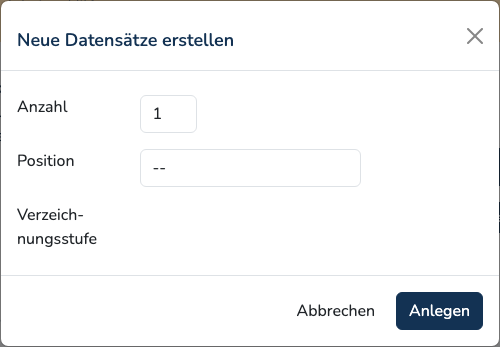
With Create, Anton assigns the reference code automatically and opens the edit form of the first new record directly.
Creating collections
A collection at the topmost level cannot be created this way, as the process requires an existing record. Initial setup is carried out by the administration.
Editing
The edit form is a continuous list, structured by sections with a grey background:
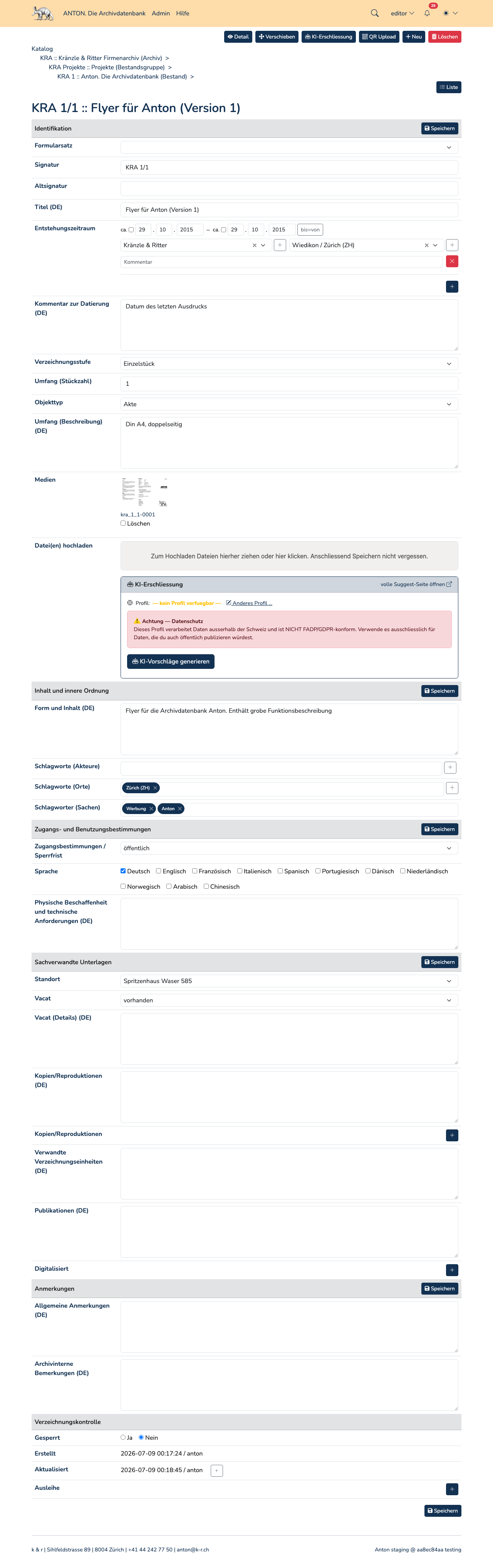
Which sections and fields appear depends on the form set and is configurable per archive. In the standard form they are: identity statement, context, content and structure, conditions of access and use, allied materials, notes and description control. Not every level of description shows all sections — at item level, «context» is absent.
Each section has its own Save button on the right; there is an additional one at the end of the form. What is saved is always the whole form, not just the section. After saving, Anton switches to the detail view.
Reference codes are not unique
Anton does not enforce unique reference codes. If a reference code that has already been assigned is entered, a notice appears on saving with a reference to the affected records — but the record is saved nonetheless. The notice is deliberately non-blocking, because duplicates do occur in practice.
Copying
The Copy button is available in the detail view — not in the edit form. In the «Copy record» window, the number of copies is specified. Title, text fields, events, actors, places and keywords are copied; the copy is attached as a sibling directly after the original and receives a new reference code. Media are not copied.
Deleting
The Delete button opens the «Delete record» window with the query «Really delete this record?». Confirmation requires entering one's own password.
Deletion is final
Anton has no recycle bin. What is deleted is the record, all subordinate units of description and their media including the files. Restoration is only possible from a backup.